



To enrol your child with Réussite A+ and start a first session, you need five things ready: your child’s name, grade, and school; your own contact details and written consent; a valid payment method; a device with a working camera and microphone; and a supervised, quiet workspace with a stable Internet connection.
Here is the minimum checklist before you open the registration form:
- Student’s full name, date of birth, grade level, and current school
- Parent or guardian’s full name, email address, and phone number
- Written parental consent (required under Quebec’s P-39.1 for any child under 14)
- A credit card or an accepted payment method for registration and session fees
- A laptop, desktop, or tablet with a webcam and microphone
- Internet connection capable of a stable speed suitable for video calls
- A quiet, supervised space for your child to work
Réussite A+ has supported many Quebec students over many years, maintaining a very high client satisfaction rate. Every tutor is recruited at the university level, so you are not handing your child off to an unvetted stranger. Quebec’s private-sector privacy law, P-39.1, governs how your child’s personal data is collected and stored throughout the process.
Key takeaways
Enrolling in online tutoring with Réussite A+ requires five things: student and parent details, parental consent under Quebec P-39.1, a working device, a stable Internet connection of at least 1 Mbps, and a supervised workspace.
| Point | Details |
|---|---|
| Administrative documents | Have your child’s name, grade, school, and your own contact and billing details ready before opening the registration form. |
| Parental consent | Quebec P-39.1 requires written consent before collecting personal data from any child under 14. |
| Internet speed | Aim for at least 3 Mbps upload and download; test at Speedtest.net, fast.com, or Google’s speed test before the first session. |
| Pre-session checklist | Confirm booking, verify payment, test camera and microphone, update your browser, and set up a quiet workspace 24–72 hours ahead. |
| Réussite A+ | University-level tutors, written progress reports, and 25+ years of experience serving Quebec families, with a 99% client satisfaction rate. |
Table of Contents
- What are the online tutoring requirements for your home setup?
- What documents and account details do you need to register?
- Who is your child’s tutor, and what will they deliver?
- How do you prepare for the first session?
- What should you expect for fees, scheduling, and cancellations?
- What privacy and child-safety rules apply to online tutoring?
- Réussite A+ already meets these requirements
- A note from Réussite A+
- Sources
- FAQ
What are the online tutoring requirements for your home setup?
Getting the technical side right before the first session saves everyone time. The good news: you do not need expensive equipment.
Device requirements
Any modern laptop, desktop, or tablet from the last five years will work. A smartphone is a fallback, not a first choice, because the screen is too small for reading worksheets or working through math problems. Your device needs a built-in or external webcam, a microphone, and a speaker (or headset). Make sure the operating system is up to date: Windows 10 or later, macOS 10.13 or later, or a current version of iPadOS or Android all support the video platforms Réussite A+ sessions run on.

For browsers, use the latest version of Google Chrome or Mozilla Firefox. Both handle video calls reliably and support screen sharing without extra plugins.
Bandwidth: the numbers that matter
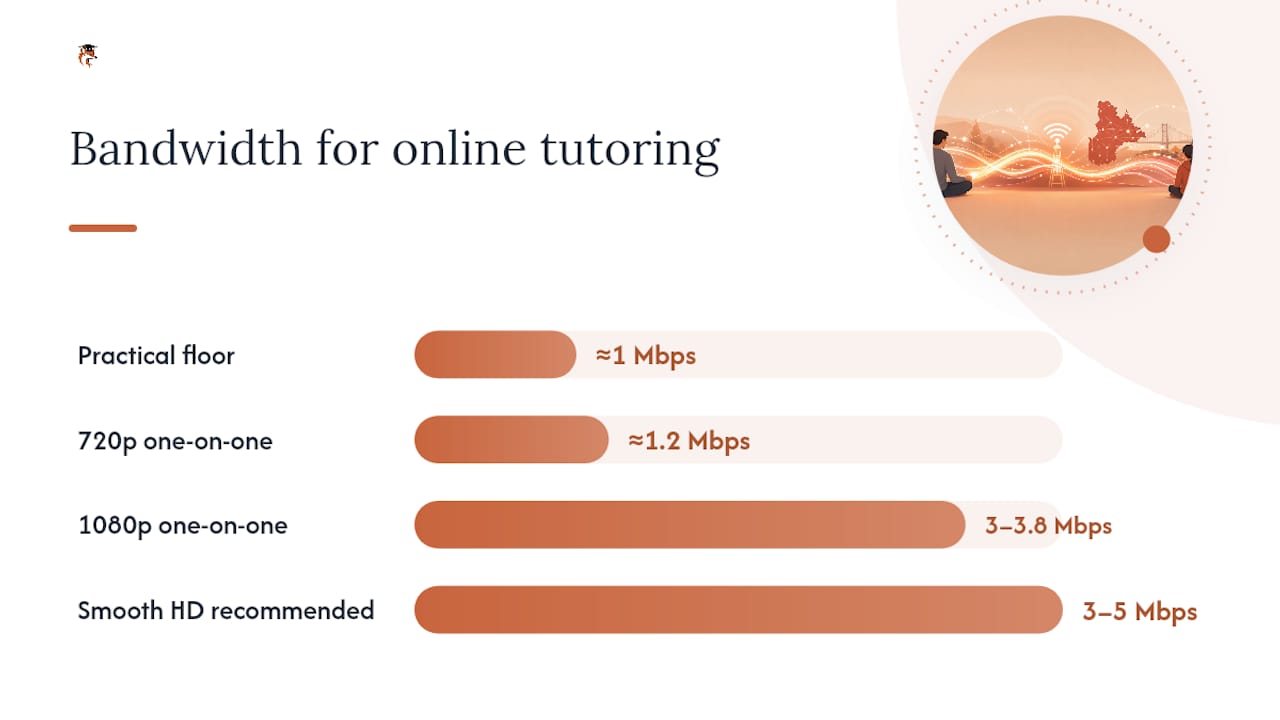
Zoom’s documentation sets the benchmark most online tutoring platforms follow. For a one-on-one HD video session, you need roughly 1.2 Mbps for 720p and 3–3.8 Mbps for 1080p, per participant. For group sessions, the requirement rises slightly. A practical guide on video-call bandwidth puts the workable floor at approximately 1 Mbps for standard calls and recommends 3–5 Mbps for a smooth HD experience.
If two or three other household members are streaming or gaming at the same time, those speeds add up fast. Test your connection at Speedtest, Fast, or Google’s built-in speed test (“Internet speed test” in the search bar) before the first session.
If your measured speed falls short, try these steps in order: move closer to your router, restart the modem, switch to a wired Ethernet connection, or schedule sessions during off-peak hours (early morning or after 9 PM when household traffic drops).
Peripherals checklist
- Headset with a built-in microphone (reduces background noise significantly)
- Laptop charger plugged in during sessions (video calls drain batteries quickly)
- External webcam if the built-in camera is low quality or broken
- Stable surface and good lighting facing your child’s face, not a window behind them
Pro Tip: A wired Ethernet connection is the single most reliable upgrade you can make. Even a basic Cat5e cable from your router to the computer eliminates the packet loss that causes choppy audio, which is the most common complaint in online tutoring sessions.
What documents and account details do you need to register?
Registration with Réussite A+ asks for two categories of information: student details and parent or guardian details. Having both ready before you open the registration form means you finish in one sitting.
Student information
- Full legal name
- Date of birth and current grade level
- Name of current school
- Subject(s) needing support (French, Mathematics, or both)
- Any known learning needs or accommodations
Parent or guardian information
- Full name, email address, and phone number
- Billing address and accepted payment method (credit card is standard)
- Written consent for data collection if your child is under 14, as required by Quebec P-39.1
After submitting the form, you will receive an email confirmation. Check your spam folder if it does not arrive within a few minutes. Some platforms also ask you to verify your email address by clicking a link before your account becomes active.
Pre-registration checklist
- Locate your child’s most recent report card (grade and school confirmation)
- Confirm your email address is one you check regularly
- Have a credit card or payment method at hand
- Read the privacy policy before consenting to data collection
- Note any specific exam dates or academic deadlines so you can share them during the intake
Who is your child’s tutor, and what will they deliver?
Every tutor at Réussite A+ is recruited at the university level, selected for academic excellence and teaching ability. This is not a marketplace where anyone can sign up. The selection process reflects the same standard that institutions like TELUQ apply: tutors must demonstrate subject mastery, the ability to give written feedback, and reliable communication habits.
What your tutor provides
- A personalised lesson plan built around your child’s current level and goals
- Written feedback after sessions, summarising progress and next steps
- Homework guidance and subject-specific resources
- Regular progress tracking so you can see improvement over time
The distinction between homework help and formal instruction matters. Tutors guide your child through problems, explain concepts, and correct errors. They do not complete assignments for your child, and they do not replace the classroom teacher.
What you provide as a parent
- Access to your child’s current textbooks, workbooks, or class notes
- A quiet, supervised workspace for your child during sessions
- Timely communication if your child misses a session or needs a schedule change
Progress reports and written feedback are delivered through the platform. Réussite A+’s approach to tracking progress means you are never left guessing whether the sessions are working.
How do you prepare for the first session?
Run through this checklist in the 24–72 hours before the first class.
- Confirm your booking by checking the confirmation email and noting the session time and the tutor’s name.
- Verify payment has processed and your account shows an active subscription or session credit.
- Run a speed test at Speedtest.net and confirm you are above 3 Mbps download and upload.
- Test your camera and microphone by opening your browser and navigating to a free webcam-test site, or by starting a test meeting in Zoom.
- Update your browser to the latest version of Chrome or Firefox.
- Grant permissions for camera and microphone access when the browser prompts you.
- Charge the device fully and keep the charger plugged in during the session.
- Set up the workspace: quiet room, good lighting, headset on, textbooks or notebooks within reach.
- Sit with your child for the first five minutes to confirm the connection is stable and introductions go smoothly.
A full walkthrough of what a typical session looks like is available in Réussite A+’s session guide.
Pro Tip: Do a short dry run the evening before: open the platform, confirm audio and video work, and have your child say hello to a family member over the call. If something breaks, you have time to fix it before the actual session. Keep a phone number handy as a fallback so the tutor can reach you if the video connection fails entirely.
What should you expect for fees, scheduling, and cancellations?
Réussite A+ uses a fee-for-service model. Typical costs include a one-time registration fee and hourly or per-session rates, with options for individual sessions or pre-paid packages. Packages generally offer a lower effective hourly rate than single sessions. Current rates are listed on the registration page.
Timeline from sign-up to first session
- Registration and tutor assignment typically take a few business days.
- During peak periods (secondary school entrance exam preparation in winter and spring), availability fills quickly. Book at least two to three weeks ahead if your child has a specific exam date.
- Institutions running distance learning in Quebec, such as Cégep à distance, model similar onboarding windows and communication timelines, which gives a useful reference point for what to expect from any structured online programme.
Cancellations and rescheduling
- Most providers require 24 hours’ notice to cancel or reschedule without a fee.
- Late cancellations or no-shows may result in a forfeited session credit.
- Refund eligibility and credit policies vary by package; review the terms during registration before paying.
- Contact Réussite A+ support directly if you need to pause or adjust a package mid-programme.
What privacy and child-safety rules apply to online tutoring?
Quebec’s P-39.1 is the governing law for private-sector data collection in the province. It requires explicit parental consent before collecting personal information from any child under 14. It also obligates service providers to publish a clear privacy policy, conduct privacy impact assessments for digital services, and protect data when it is transferred outside Quebec.
What this means practically for you as a parent:
- Read Réussite A+’s privacy policy before completing registration. It must state what data is collected, how long it is kept, and whether it is shared with third parties or transferred outside the province.
- You have the right to request a copy of your child’s personal data and to ask for corrections.
- Do not allow your child to share sensitive home information (full address, school schedule, financial details) during sessions.
- For children in elementary school, stay within earshot during sessions. You do not need to sit beside them for every minute, but being nearby lets you respond quickly if a technical or safety issue comes up.
- Check whether sessions are recorded. If recording is enabled, confirm where recordings are stored and who can access them.
To report a privacy concern, contact Réussite A+ support through the platform’s help channel. For a legal question about P-39.1 obligations, the CanLII text of the law is publicly available.
Réussite A+ already meets these requirements
Réussite A+ is built around exactly the checklist above: university-level tutors, written progress reports after every session, technical support for setup questions, and 25+ years of experience serving Quebec families.

Getting started takes two steps. First, run through the technical checklist in this article and confirm your device, speed, and workspace are ready. Then start your registration on the Réussite A+ signup page. If you have questions about setup or want to understand the benefits of online tutoring before committing, the support team can walk you through it. Privacy compliance and technical guidance are part of the service, not an afterthought.
A note from Réussite A+
We ask for these requirements because every minute of a tutoring session belongs to your child’s learning, not to troubleshooting a frozen screen or tracking down a missing consent form. The technical and administrative steps in this article exist to protect that time and to keep your child’s personal information safe under Quebec law. Our goal is simple: when your child logs in for the first session, everything works, the tutor is prepared, and the only thing left to do is learn.
Sources
Speed-test tools
Platform and bandwidth guidance
Quebec privacy law
Onboarding and tutor standards
Réussite A+ pages
FAQ
What is the minimum Internet speed for online tutoring?
Aim for at least 1 Mbps for a basic video call, though 3 Mbps or higher gives a noticeably smoother experience. Zoom’s documentation recommends 1.2 Mbps for 720p and 3–3.8 Mbps for 1080p per participant.
Does Réussite A+ require parental consent for children under 14?
Yes. Quebec’s P-39.1 requires explicit parental consent before any service collects personal information from a child under 14, and Réussite A+ follows this obligation during registration.
What grade levels does Réussite A+ accept?
Réussite A+ serves elementary and secondary school students across Quebec, covering core subjects including French and Mathematics, as well as preparation for secondary school entrance examinations.
How long does it take to get matched with a tutor after registering?
Tutor assignment typically takes a few business days after registration is complete. During high-demand periods such as spring exam preparation, booking two to three weeks in advance is advisable.
What happens if the Internet connection drops during a session?
Reconnect immediately by refreshing the browser or restarting the video platform. If the connection does not restore within a few minutes, contact your tutor through the platform’s messaging function or by phone to reschedule the remaining time.